[JavaScript] OOP - 2. Objects
October 16, 2021
0. Table of Contents
- What is OOP
- Objects 👉 Current Page
- Prototypes
- Prototypical Inheritance (TBD)
- ES6 Classes (TBD)
- ES6 Modules (TBD)
1. Creating Objects
const circle = {}; // using object literal syntax- 중괄호 (
{})를 객체 리터럴 구문이라고 한다.
const circle = {
  radius: 1,
  location: {
    x: 1,
    y: 1
  },
  draw: function() {
    console.log('draw');
  }
};- 객체는 key-value 쌍을 가진다.
- value 값으로 객체나 함수도 가질 수 있다.
- 객체의 속성으로 존재하는 함수는 메소드라고 부른다.
- 위의
circle객체는 Properties로radius와location가 있고 Methods로draw가 있다.
circle.draw(); // 출력 결과 : draw- Dot (
.)으로 객체의 Properties 및 Methods에 접근할 수 있다.
2. Factories and Constructors
2-1. Factories
-
Bad Example
const circle1 = { radius: 1, location: { x: 1, y: 1 }, draw: function() { console.log('draw'); } }; const circle2 = { radius: 2, location: { x: 2, y: 2 }, draw: function() { console.log('draw'); } };- 서로 다른 객체 내의 각 draw 메소드는 동일한 역할을 한다. 이 때 draw 메소드를 객체를 생성할 때마다 넣게 되면 불필요한 코드 중복이 발생한다. factory나 constructor function을 이용하여 해결할 수 있다. 아래의 Good Example을 보자.
-
Good Example - Using Factory
// Factory Function function createCircle(radius, x, y) { return { radius, location: { x, y }, draw: function() { console.log('draw'); } }; } const circle1 = createCircle(1, 1, 1); const circle2 = createCircle(2, 2, 2);createCircle이라는 함수를 생성했다. 이 함수는 객체를 반환하고 객체 내의 속성은 함수의 매개변수로 받아오도록 처리한다.- 이와 같은 방식을 Factory Function 을 이용한 방식이라고 한다.
- Factory Function을 이용하면 객체를 생성할 때마다 객체 내부의 메소드를 매번 다시 정의하지 않아도 된다.
2-2. Constructors
// Constructor Function
function Circle(radius, x, y) {
  this.radius = radius;
  this.location = {
    x,
    y
  }
  this.draw = function() {
    console.log('draw');
  }
}

const myCircle = new Circle(1, 1, 1);
console.log(myCircle.radius); // 1- Constructor Function의 네이밍 컨벤션으로 첫 글자를 대문자로 한다.
- Factory Function이 Object를 return하는 방식이였다면, Constructor Function은 this 키워드를 사용하는 방식이다.
- Constructor Function을 이용해서 객체를 생성할 때는 new 키워드를 사용한다.
- new 키워드는 빈 객체(
{})를 생성하도록 하고 함수 내this는 이 빈 객체를 가리키게 된다. this가 이 빈 객체를 가리키고 이 빈 객체에this.radius와 같은 방식으로 Properties와 Methods를 추가하는 것이다.- new 키워드를 사용하면 Constructor Function이 자동으로
return this를 하게 된다. - 따라서 Properties와 Methods가 추가된 이 객체가 반환되고 반환된 객체를
myCircle에 할당하고 있기 때문에myCircle.radius을 출력하면 정상적으로1이 출력된다. - 만약 new 키워드를 사용하지 않고
const badCircle = Circle(2, 2, 2);와 같이 작성했다면 함수 내this는badCircle가 아닌Window(브라우저 기준)가 된다. -
constructor 속성
console.log(myCircle.constructor); // f Circle(...) {...} console.log(Circle.constructor); // f Object() {...}- 모든 Object 는 constructor 속성에 접근할 수 있다. 위의 코드에서
myCircle.constructor는Circle함수를 가리킨다. - 그리고
Circle.constructor는 자바스크립트에 내장된 함수인Object함수이다.
- 모든 Object 는 constructor 속성에 접근할 수 있다. 위의 코드에서
2-3. Functions are Objects
function Circle(radius, x, y) {
  this.radius = radius;
  this.location = {
    x,
    y
  }
  this.draw = function() {
    console.log('draw');
  }
}

const myCircle = new Circle(1, 1, 1);- 위의
Circle함수는 사실 하나의 Object다. Circle.을 입력하면 접근할 수 있는 멤버(methods, properties)들이 자동 추천 목록으로 뜬다. (ex. apply, arguments, bind, call, caller, length, name, prototype, toString, …)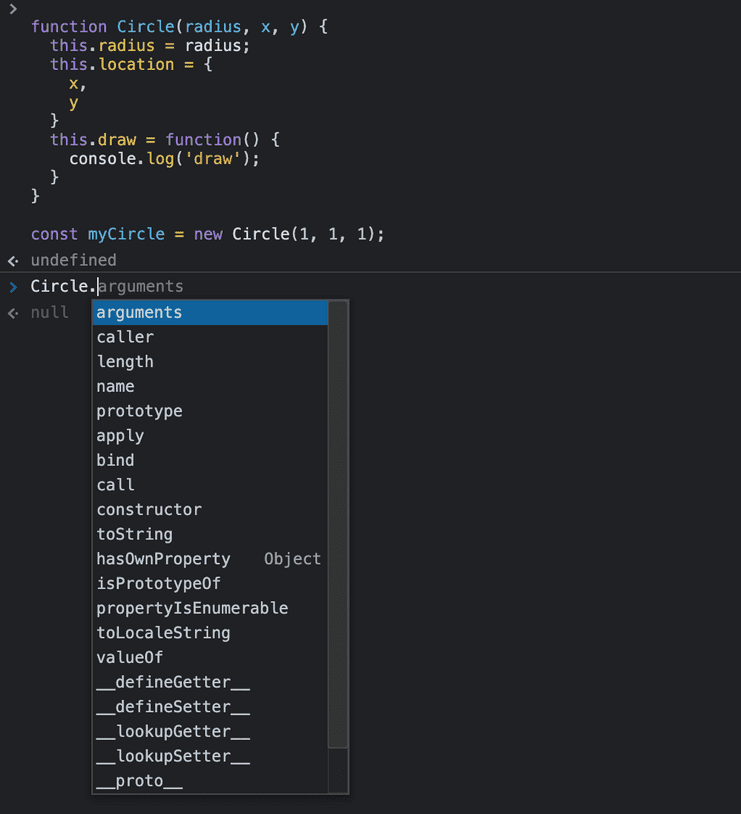
- JavaScript의 모든 객체는 Constructor 속성이 있고 이 Constructor는 해당 객체를 생성할 때 사용되는 함수를 가리킨다.
- 함수는 객체라고 했기 때문에 위의
Circle함수도 하나의 객체이므로 Constructor 속성을 가지고, 이 Constructor는 이Circle을 생성할 때 사용된 함수를 가리킨다.
따라서Circle.constructor을 출력해보면ƒ Function() { [native code] }(자바스크립트에 내장된 Constructor인 function)가 출력된다. function Circle() {...}와 같이 함수를 선언할 때, 자바스크립트 엔진은 function constructor을 이용해서 객체를 생성하게 된다.
3. Primitives and Reference Types
3-1. 두 가지의 타입 종류
-
JavaScript에는 두 가지 타입 종류가 존재한다.
-
Value Types (Primitives)
- Number
- String
- Boolean
- Symbol
- undefined (ES6)
- null (ES6)
-
Reference Types
- Object
- Function
- Array
-
3-2. Primitives와 Objects의 동작 방식 비교
- Primitives와 Objects는 동작하는 방식이 다른데, JavaScript의 Prototypes를 이해하기 위해서는 반드시 꼭 알아야 한다.
-
Primitives
let x = 10; let y = x; x = 20; console.log(x); // 20 console.log(y); // 10- 위의 코드에서
x와y는 완전히 독립된 두 개의 변수이다. - 처음
x에 10을 할당하고 그 이후에y에x를 할당한 후x에 20으로 재할당하면x는 20으로 변경되지만y는x의 변경과는 상관없이 여전히 10이다. - 값을 변수에 할당할 때 해당 메모리 변수 내부에 해당 값이 저장된다.
- 위의 코드에서
-
Objects
let x = { value: 10 }; let y = x; x.value = 20; console.log(x.value); // 20 console.log(y.value); // 20x.value와y.value는 모두 20이다.- 객체를 변수에 할당할 때 해당 객체는 해당 변수에 저장되지 않는다. 객체는 메모리의 다른 곳에 저장되고 해당 메모리 위치의 주소는 해당 메모리 변수 내부에 저장된다.
let y = x;와 같이y에x를 할당하게 되면 참조 할당이 일어난다. 즉, 객체 자체가 복사되어 새로운 메모리에 할당되는 것이 아니라 해당 객체가 저장되어 있는 메모리의 주소값이 복사되는 것이다.- 따라서
x와y는 동일한 객체를 가리키게 되고x.value의 값을 변경하면y.value의 값도 변경되는 것이다.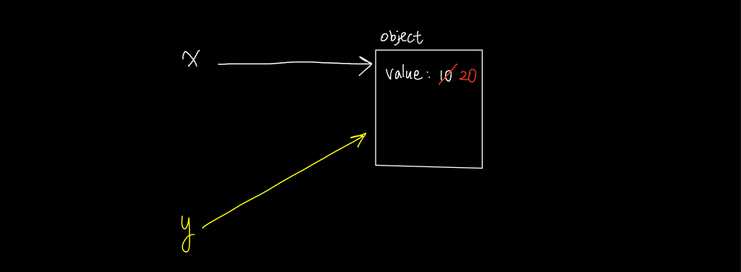
-
결론
- Primitives are copied by their value
- Objects are copied by their reference
-
Primitives are copied by their value - Example
let number = 10; function increase(number) { number++; } increase(number); console.log(number); // 10;increase함수를 호출할 때 함수에서 받은number라는 매개변수는 코드 1행의number와는 완전히 별개의 변수이다.- 따라서 함수 내부에서
number의 값을 증가시키더라도 1행의number와는 상관이 없기 때문에 코드 마지막 행에서number값을 출력하면 10이 출력된다.
-
Objects are copied by their reference - Example
let obj = { value: 10 }; function increase(obj) { obj.value++; } increase(obj); console.log(obj.value); // 11;increase함수를 호출할 때 함수에서 받은obj라는 매개변수는 코드 1행의obj와는 별개의 변수이지만 같은 객체{ value: 10 }을 가리킨다. (객체는 참조 복사가 되기 때문.)- 따라서 함수 내부에서
obj.value의 값을 증가시키면 1행의obj도 같은 객체를 가리키고 있기 때문에 코드 마지막 행에서obj.value를 출력하면 11이 출력된다.
4. Working with Properties
4-1. Adding or Removing Properties
function Circle(radius) {
  this.radius = radius;
  this.draw = function() {
    console.log('draw');
  }
}

const circle = new Circle(10); // circle object 생성

circle.location = { x: 1 }; // location 속성 추가
console.log(circle); // { radius: 10, location: { x: 1 }, draw: f }

circle['name'] = 'c1';
console.log(circle); // { radius: 10, location: { x: 1 }, name: 'c1', draw: f }

delete circle['location'];
delete circle.name;- 자바스크립트의 객체는 동적(dynamic)이다.
- 객체를 생성한 후에 해당 객체에 속성을 추가할 수 있고 또 속성을 삭제할 수 있다.
- 모든 속성을 미리 정의하지 않아도 필요에 따라 객체가 만들어진 이후에 속성을 추가할 수 있다는 장점이 있다.
- 객체의 속성은
.이나[]으로 접근/추가할 수 있다. - Dot Notation(
.)은 Brackets Notation([])보다 표기법이 심플하다. - Bracket(
[])은 동적인 속성명으로 접근할 때 유용하다. ex)circle[propertyName] -
또한 Bracket(
[])은 유효한 식별자가 아닌 속성 이름을 사용할 때 유용하다.circle.center-location과 같은 접근은 불가능하다.circle['center-location']과 같은 접근은 가능하다.
- 객체의 속성을 제거할 때는
deleteOperator 를 사용하면 된다.
4-2. Enumerating Properties
-
for in loop
function Circle(radius) { this.radius = radius; this.draw = function() { console.log('draw'); } } const circle = new Circle(10); for (let key in circle) { console.log('key is ' + key); console.log('value is ' + circle[key]); }- 객체의 속성을 반복하거나 열거해야할 때 for in loop를 사용할 수 있다.
- 객체 내 속성의 key 들을 반복문으로 돌면서 가져온다.
- 객체 내 속성의 value에 접근하고 싶을 때는
circle[key]와 같이 접근하면 된다.
-
Object.keys()
const keys = Object.keys(circle); console.log(keys); // ["radius", "draw"]- Object.keys()는 객체 내 모든 key값들을 배열로 반환해준다.
-
in operator
if ('radius' in circle) { console.log('Circle has a radius') }- in operator를 이용하여 객체가 특정 key를 가지고 있는지 확인할 수 있다.
5. Private Properties
5-1. Abstraction
function Circle(radius) {
  this.radius = radius;

  this.defaultLocation = {
    x: 0,
    y: 0,
  };

  this.computeOptimumLocation = function() {
    // ...
  }

  this.draw = function() {
    this.computeOptimumLocation();
    console.log('draw');
  }
}

const circle = new Circle(10);
circle.defalutLocation = false; // Bad
circle.computeOptimumLocation(); // Bad- object type인
circle.defaultLocation에 뜬금없이false를 할당한다거나,
draw메소드 안에서만 호출 되기를 바라는computeOptimumLocation메소드를 직접적으로 호출하면 객체를 나쁜 상태로 만들 수 있다. - 이 때 우리가 알아야 하는 개념이 Abstraction(추상화)라는 객체 지향 프로그래밍의 핵심 개념이다.
- 추상화란, 세부사항을 숨기고 필수사항만 보이게 하는 것이다. (Hide the details, Show the essentials)
- 추상화를 쉽게 설명하면 DVD Player처럼 내부는 복잡한 로직을 갖고 있지만 외부에 보여지는 것은 간단한 몇 개의 버튼 뿐이다.
- 추상화를 통해서 위의
Circle함수에서radius와draw만 외부에서 접근 가능하도록 하고defaultLocation과computeOptimumLocation은 외부에서 접근 불가능하도록 해보자.
5-2. Private Properties
function Circle(radius) {
  this.radius = radius;

  let defaultLocation = {
    x: 0,
    y: 0,
  };

  let computeOptimumLocation = function() {
    // ...
  }

  this.draw = function() {
    computeOptimumLocation();
    console.log('draw');
  }
}

const circle = new Circle(10);- 함수 내에 local 변수를 두면 이 변수는 객체의 properties가 되지 않는다.
- 함수 내의 로컬 변수는 함수 밖으로 빠져나가는 순간 스코프를 벗어나게 되고 이 함수 외부에서는 해당 변수에 접근할 수 없게 된다.
- 따라서
this.defaultLocation대신let defaultLocation과 같이 로컬 변수로 정의하면 함수 외부로부터 숨길 수 있다. - 우리는
defaultLocation과computeOptimumLocation을 외부에서 직접 접근이 불가능하도록 만들고 싶기 때문에 로컬 변수로 변경했고
draw메소드 내에서 호출하고 있었던this.computeOptimumLocation()대신computeOptimumLocation()으로 변경했다. draw메소드 내에서computeOptimumLocation을 호출하면Circle외부에서draw메소드를 호출할 때computeOptimumLocation이 정상적으로 실행되는데,
이는 자바스크립트의 클로저(Closure) 개념 때문에 가능하다.
6. Getters and Setters
위에서는 함수 외부에서 접근하지 못하도록 하는 방법으로 로컬 변수를 두었는데
어떻게 하면 함수 외부에서 수정은 못하도록 하고 읽기만 가능하도록 할 수 있을까?
6-1. 방법 1 - 로컬 변수를 조회하는 메소드를 생성한다
function Circle(radius) {
  this.radius = radius;

  let defaultLocation = {
    x: 0,
    y: 0,
  };

  this.getDefaultLocation = function() {
    return defaultLocation;
  }

  this.draw = function() {
    console.log('draw');
  }
}

const circle = new Circle(10);
console.log(circle.getDefaultLocation()); // { x: 0, y: 0 }defaultLocation이라는 변수는Circle함수 외부에서 직접적으로 접근은 불가능하지만
getDefaultLocation이라는 함수를 통해서 (클로저 개념을 이용해)defaultLocation변수를 조회할 수 있다. (수정은 불가능)
6-2. 방법 2 - defineProperty의 Getters
function Circle(radius) {
  this.radius = radius;

  let defaultLocation = {
    x: 0,
    y: 0,
  };

  this.draw = function() {
    console.log('draw');
  }

  Object.defineProperty(this, 'defaultLocation', {
    get: function() {
      return defaultLocation;
    }
  });
}

const circle = new Circle(10);
console.log(circle.defaultLocation); // { x: 0, y: 0 }- defineProperty를 이용해서 속성을 정의할 수 있다.
- defineProperty의 첫 번째 argument로 property을 추가하고 싶은 대상 객체를 넣어준다. (this)
- defineProperty의 두 번째 argument로 property 이름을 넣어준다.
- defineProperty의 세 번째 argument로는 객체를 넣어준다. 이 객체에
get이라는 이름의 key를 지정해주고 value로는 함수를 넣어준다.
위 코드의 마지막 줄에서circle.defaultLocation과 같이 접근하면 이get함수가 호출되는 것이다. circle객체를 출력 해보면 아래와 같이 새로운 property인defaultLocation이 추가된 것을 볼 수 있다. 이것은 read-only 속성이다. 만약에 이 속성을 변경하고 싶다면 setters를 사용해야 한다.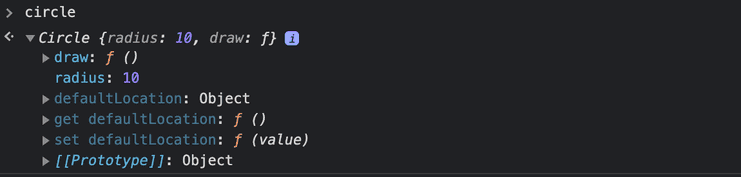
6-3. 값을 수정할 때는 Setters를 이용할 수 있다
function Circle(radius) {
  this.radius = radius;

  let defaultLocation = {
    x: 0,
    y: 0,
  };

  this.draw = function() {
    console.log('draw');
  }

  Object.defineProperty(this, 'defaultLocation', {
    get: function() {
      return defaultLocation;
    },
    set: function(value) {
      if (!value.x || !value.y) {
        throw new Error('Invalid location.');
      }
      defaultLocation = value;
    }
  });
}

const circle = new Circle(10);
circle.defaultLocation = { x: 10, y: 20};
console.log(circle.defaultLocation); // { x: 10, y: 20 }

